Posts

Doosan DX300LC Excavator Lower Roller Reassembly and Disassembly Guide
Image
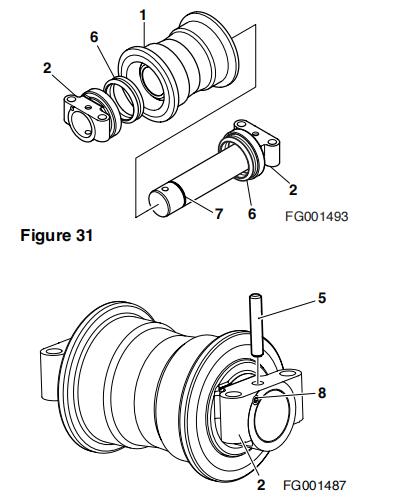
This instruction show you guide on how to reassembly and disassembly lower roller for Doosan DX300LC excavator. Doosan DMS-5 Download Procedures: 1. Degrease, clean and dry all parts before reassembly. Insert bushing into roller. https://www.car-auto-repair.com 2. Apply grease to the O-rings (7, Figure 29) and insert into axle. 3. Align collar (2, Figure 30) and axle (3) pin holes and pin (5) the collar. 4. Insert floating seals (6, Figure 31) into the roller (1) and collar (2). NOTE: Apply clean engine oil to the joint side of the floating seal. Apply grease to the floating seal O-ring. 5. Slide the axle inside the roller. 6. Install the collar (2, Figure 32), O-ring (7), and pin (5) on the remaining side. 7. Fill with clean engine oil with approximately 480.0 cc (16.2 oz). 8. Install plug (8, Figure 32) on the collar. Doosan EPC Lower Roller Installation 1. Install four bolts to hold lower roller assembly to track frame. NOTE: To gain access to some rollers a link guard may have to b...

Doosan DX300L Excavator Front Idler Roller Disassembly Guide

Image
This illustration show you guide on how to disassemble front idler roller for Doosan DX300L excavator. Procedures: 1. Remove plug (9, Figure 15) from idler assembly (1), and drain into a suitable container. Doosan DMS-5 Diagnostic software 2. Separate the pin (6, Figure 16) from the bearing (3). 3. Use a press to remove the bearing from the axle (4). Separate the O-ring (8, Figure 17) from the axle.

How to Remove Track for Doosan DX300L Excavator

Image
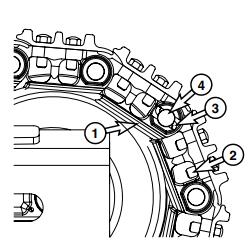
This illustration show you guide on how to assemble track for Doosan DX300L excavator. Procedures: 1. Position machine on a smooth level surface with adequate room for forward and reverse travel. 2. Relieve track tension. Refer to "Track Tension" in this section for procedure. 3. Move machine until master link (1, Figure 8) is positioned nat approximately 10 o'clock from top position on front idle roller. Doosan DMS-5 4. Remove four nuts and bolts (2, Figure 8) holding shoe to link. Remove enough shoes to make access to lock pin easier.

How to Assemble Carrier for Doosan DX300L Excavator

Image
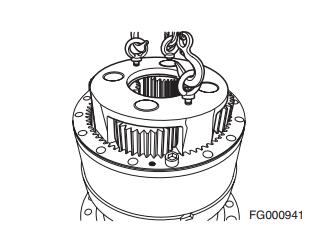
This illustration show you guide on how to assemble carrier for Doosan DX300L excavator. Doosan Data Monitoring System DMS-5 Free Download 2020 Doosan Excavator Workshop Manual Procedures: 1. Using a suitable lifting device, lower No. 2 carrier assemblyinto ring gear, making sure that planetary gears are engaged. Continue to lower carrier and engaging it onto splines of pinion shaft. Make sure that carrier is resting on bearing.   NOTE: Make sure that carrier and drive shaft can rotate.

Doosan DX300L Excavator Ring Gear Assemble Guide

Image
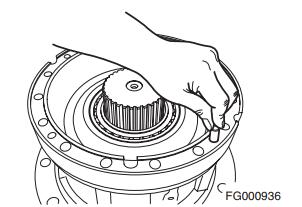
This illustration show you guide on how to assemble ring gear for Doosan DX300L excavator. Doosan DMS-5 Diagnostic Software Procedures: 1. Insertion of lock pin. Insert four lock pins in four reamed holes of case flange. Tap them into place, by gently hitting them with a softface hammer.  

Doosan DX300L Excavator Seal and Bearing Assemble Guide

Image
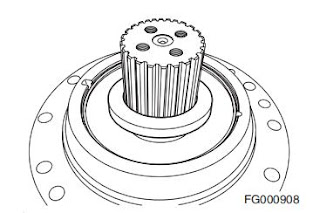
This illustration show you guide on how to assemble seal and bearing for Doosan DX300L excavator.   Procedure: 1. Postion case so that pinion gear is pointing down. Doosan DMS-5 2. Make sure that there is no foreign substance left on seal assembly, apply grease to and around lip of oil seal (TC5001300) as in Figure 75 and Loctite #609 to its external part.  

Doosan DX300LC Excavator Main Case Assemble Guide

Image
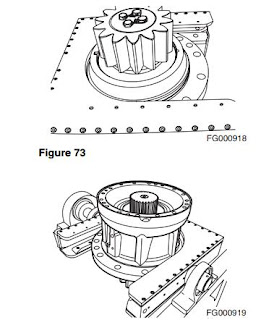
This instruction show you guide on how to assemble main case for Doosan DX300LC excavator. Doosan Data Monitoring System DMS-5 Free Download Procedures: Cleaning Casing and Other Parts Steam clean case and other parts, to remove any foreign substances. • Cleaning fluid: PK6540 (alkali) • Liquid density: 3 - 5% • Liquid temperature: 60° - 70˚C (140° - 158°F)